Posts

A Basic Recipe for Machine Learning
Image
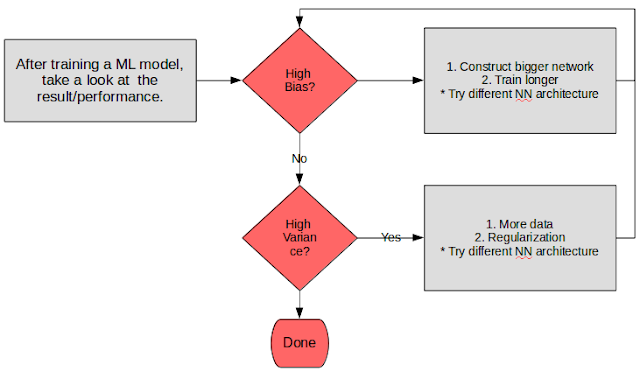
Ever since wrapping up the three Deep Learning courses by Andrew Ng I've been meaning to write down some of the gems that he's highlighted throughout the course. One of the nice ones that I felt needed to be written down is his general recipe to approaching a deep learning algorithm/model. I've basically summarized it in a flowchart below (because everybody loves a flowchart right?) Basic deep learning recipe What is bias and variance? The below diagram is the typical explanation that I'm sure most of us are used to.  Graphical illustration of bias and variance How can we know if we have high bias or high variance?  For high bias, we could take a look at the training set performance. A poor performance is an indicator of a poor model fit, and signals that we could try to apply a bigger network to get a better fit of the model. For high variance, we could take a look at the validation set (or dev set - as Andrew calls it) performance. ...

Reviewing Andrew Ng's Deep Learning Course: Neural Network and Deep Learning

Image
Feeling rather good about myself as I'm writing this as I've just completed the first course of Andrew Ng's latest Deep Learning specialization on Coursera. I've been meaning to learn about Deep Learning for quite awhile now but haven't been able to wrap my heads around the theory aspect of it for longest of time. Previously, my foray into deep learning has been via Udacity's Deep Learning materials, random internet articles, and the Deep Learning textbook. Yes. THE textbook.  Bought it from Amazon a few months ago, and am still going through the pages. Still finding it tough to find the time between going through a few pages, the day job, and sorting out the kids at night. From what I've gone through so far, I'd imagine that I would need to brush up on my rusty math in order to be able to fully appreciate the book. I have a confession to make though. I never really did go through Andrew Ng's first ML course (gasps!)...

Setting Up Docker for Windows 10

Image
Didn't really had any use for Docker until today. Was trying to follow a course via Safari Online, and long story short - I'd probably need a docker to simplify setting up all the infra. Except setting Docker itself turned out to be quite a problem for me. Here's how I got it to work. 1. Downloaded Docker (community edition) from their website (https://www.docker.com/) 2. Installed it. 3. Checked whether hyper-V is enabled. ( Go to task manager -> Performance -> CPU and you should see as section as "Virtualization : Enabled") [1] 4. Open up PowerShell 5. Use 'docker-machine create ' to create a virtual machine. I named mine 'box' 6. Configure your shell (refer to image) Reference:  [1] : https://stackoverflow.com/questions/40459280/docker-cannot-start-on-windows [2]: https://docs.docker.com/docker-for-windows/#explore-the-application-and-run-examples

Book Review: Weapons of Math Destruction (Cathy O'Neil)

Image
This post marks my first attempt in trying to force myself to gain a better understanding of the books that I've read. Previously, I find myself reading books after books without being able to recall the important things that I've learned earlier. It's rather frustrating to be honest. So I'm trying this out as a way for me to push myself to understand the book and synthesize the various concept and ideas that are conveyed from the book. A disclaimer: My reviews will not attempt to be neutral or unbiased - as I feel that any attempt for me to try and write such kind of a blog post would result in a dry and boring outcome. Guess you could say that it'd probably be much more of a rant rather than review. Moving on. I bought the book from Amazon quite awhile back in April and it has been on the shelf for quite sometime as I was another book at that time. The outline is rather interesting, as it highlights the pitfalls of big data implementation from a f...

A Retrospective Look On What it Means To Be A Data Scientist

Image
The Sexiest Job - HBR I've talked about this subject in some of my posts in my earlier years of working as a data scientist, namely in these 2 blog posts: 1.  Journey In Data Science 2.  Hindsight, 8 Months Down The Analytics Road So now 3 years down the road, I guess I am a little more knowledgeable on the matter, a little bit wiser. Back to that definition I was talking about, recently there has been two articles which I think provides a good description of what are the skills needed to become a data scientist, and what are the role that a data scientist play in a day to day setting. In the final half of this post, I'll include my 2 cents on the articles and how it relates to my daily work. The Skills [1] Picking it up from Forbes (which in turn picked it up from Quora), the top 5 skills are: 1. Programming.  I guess this is pretty much a no brainer. Programming skills do come in handy especially when you're trying to (1) massage data, and (2) auto...

Research Sample Size

Image
Sometimes part of being a data scientist requires that you actually do act like a "scientist" (obviously). In this post, we're going to have a look at a "not-so" popular subject of determining the right sample size that allows you to make a proper conclusion with respect to the population that you're interested in. More often than not, people usually assume that a sample size needs to bear some proportional relationship to the size of the population from which it is drawn. This not necessarily be the case. Rather, at some point, having more samples need not mean a greater accuracy in doing your analysis. What this means is, you really don't need to gather as much samples as possible in order to come up with a reasonable conclusion that can be applied to the population at large. The absolute size of a sample is much more important. The size is pretty much dependent on the variation in the population parameters under study and the amount of e...

Setting Up Tensorflow (with CUDA) for Windows 10

Image
Below are some of my rough notes on how I've setup my Windows 10 laptop to use Tensorflow with CUDA. My reference: http://www.heatonresearch.com/2017/01/01/tensorflow-windows-gpu.html https://www.tensorflow.org/install/ Install the following NVidia drivers: CUDA Drivers (http://docs.nvidia.com/cuda/cuda-installation-guide-microsoft-windows). Currently it's CUDA Toolkit 8.0. Can install using the installer downloaded. CUDNN - CUDA for Deep Neural Networks (https://developer.nvidia.com/cudnn). Currently it's 5.1. Once extracted, place the files in the respective directory along with the other CUDA files in the NVIDIA Toolkit folder Setting up Tensorflow (CPU) Setting up Tensorflow (GPU) Note: It's 22/2/2017 now and Google have recently released their Tensorflow 1.0, which might've rendered the above guide obsolote (i've haven't tested them yet). Update (23/2/2017): The above basically creates 2 new anaconda instance for you to pla...

Running a separate H2O instance from R

Traditionally in R, an H2O instance that is created using h2o.init() will be shared by everyone else. This poses a problem since because the resources (threads) are shared - everyone can't basically do work at the same time. While h2o.init() itself has a function to specify which port and ip, it is currently buggy since you can't initiate an instance without using the 54321 port. To work around this, you'll need to initiate an h2o instance externally from unix. From there, you can then connect directly to your defined instance.In addition, connecting to an instance in this manner provides another layer of protection, since you're no longer relying on libraries that are loaded in R (libraries that are loaded in R can be removed by other users using RStudio). You may use the following command to: 1. Create h2o instance externally 2. Connect to your h2o instance from R. So basically from R; launchH2O system(command = launchH2O, intern =FALSE, wait=FALSE) h2o....

Create ad hoc wifi network and monitor mobile traffic

Image
1. First off, ensure that you have a wired connection to your laptop. 2. Using Lenovo Access Connections, ensure that your laptop is connected to your LAN. 3.  Go to 'Mobile Hotspot'. Fill the necessary details. Start the network. 4.  From your mobile, you should be able to see the SSID. Connect to it. 5. From Windows, find out which network is your wifi using. In our case it's 'Wireless Network Connection 7.  6. Initially you will not see the connection being able to connect to the internet. 7. Go to Local Area Connections. 8.  Go to Properties, then Sharing. Enable your sharing to allow your adhoc wifi network to connect to the internet via your LAN. 9.  Allow the needed services. 10. OK everything. 11. Wait for a few minutes to allow the changes to take place. 12. Your mobile should now be able to connect to the internet vi...

Transfer Data from RDBMS to Hadoop Using Sqoop/Oozie/Hue

Image
A lengthy title. I know. Cutting to the chase, I needed to transfer data from my RDBMS to a Hadoop cluster and I only had access to Hue/Oozie (since I’m not an admin). I knew that I could use Sqoop to do it — but I’ve never really done it before. It was freaking hard/annoying! So to help others out there who might be in a similar predicament as I was, here are some 101. 1. I assume you already know how to use the Workflow Editor, so from there, create a new Workflow. 2.  Drag a Sqoop action from the panel above and click OK. 3. You’ll get some pre-filled sqoop command in there which you can use as reference. Hop to Apache Sqoop to learn more about all available arguments you can use. 4. There’s 2 way you can go about entering the Sqoop command from here on out. You can either type in the Sqoop command in the text box, OR if you’re thinking of using a query in your command, my recommendation is to use the argument window. The latter is based on a post ...

Natural Language Processing by Stanford

Image
Below is a great course by Stanford University on Natural Language Processing. There hasn't been any recent sessions as of late in Coursera, but you can still access the archive at this  link. I'm currently working on my capstone for the John Hopkins Data Science Specialization, where we're asked to build a data product that is able to predict the next sets of word based on what users type into a textbox - similar to stuff like Google Autocomplete or Swiftkey. Pretty psyched about it - looking forward to the challenge! :)

Behavioural Economics

Image
Below are a few notes (most are copy pastes) of stuff that I've covered during my time at Dilip Soman's Behavioural Economics online course at edX. The topic is a recent interest of mine after spending some time earlier this year learning about social graphs and basic graph theory in general. So as a natural extension to that, a question that comes to mind is, how do people make purchasing decision? The notes have been mostly compiled in Slack - somehow I kinda take a liking in the way the notes there get formatted. It's relatively easy too - perfect for lazy people like myself. Below are the public links of my notes in Slack with regards to the topic: Early General Notes A Theory of Decision Points Choice Overload   Glossary of Concepts Consumption Vocabulary Recent Nudge Experiments Decision Aids Disclosure One thing that I really like about the course is that it also talks about how to conduct experiments should you have an idea that you'd like ...

Geospatial Display with Shiny

Image
One of the reason I like to join these online courses are that it gives you the chance to meet with people from different backgrounds, industries and countries. In this particular post, I'm quite amazed with the dedication and thought that was put in by one of my classmates. The assignments required that we create our own data product using R - so that we become a wholesome data science practitioner - we acquire data, process, model, document, and create data products for others to consume. It's one thing for doing assignments for the sake of completing the course, it's another to produce a beauty such as the above. You may explore the Shiny app here at this link , and have a look at the forked source code here . I've forked it since I know I'll be making use of this in times to come.

Using R with Shiny

Image
Lately I've been studying Shiny and how to use in R. It's a cool arsenal to have while using R as you can really quickly develop a data product right from R itself. Of course you could say load the data up in tools like Tableau or Qlik Sense are have a much cooler/sexier visualisation - but that's not the point I'm trying to bring here. For a quick preview of what I managed to conjure up with Shiny, pop over to Social Network  . Couldn't help it - it just had to be a network graph - again :P. A real sucker for graphs I am. Anyways, what it aims to demonstrate are how from a social network graph like that, you can derive the centralities (degree, closeness etc) and from there - the roles of each nodes based on how they are connected to each other. I'll not be making the claim that it's correct in any way - it's just something that I've picked up from Drew Conway, based on his presentation on Socio-Terrorism . For more details - check ou...

Notes on R Machine Learning Packages

The below excerpt are taken from  this page.  Copying it here for future reference in finding the right R packages for different types of analysis - god knows it's hard to find the right packages in R. :) Several add-on packages implement ideas and methods developed at the borderline between computer science and statistics - this field of research is usually referred to as machine learning. The packages can be roughly structured into the following topics: Neural Networks  : Single-hidden-layer neural network are implemented in package  nnet  (shipped with base R). Package  RSNNS  offers an interface to the Stuttgart Neural Network Simulator (SNNS). An interface to the FCNN library allows user-extensible artificial neural networks in package  FCNN4R . Recursive Partitioning  : Tree-structured models for regression, classification and survival analysis, following the ideas in the CART book, are implemented in  rpart  (shipped w...